- Published on
Facade design pattern
- Authors
- Name
- Soulaimane Yahya
- @soulaimaneyh


In this article, we’ll take a deep dive into Facade design pattern, exploring its key features and providing practical expls of how to use it.
Table Of Contents
- Facade design pattern
- How to implement Facade
- Creating Facade class
- Conclusion
Facade design pattern
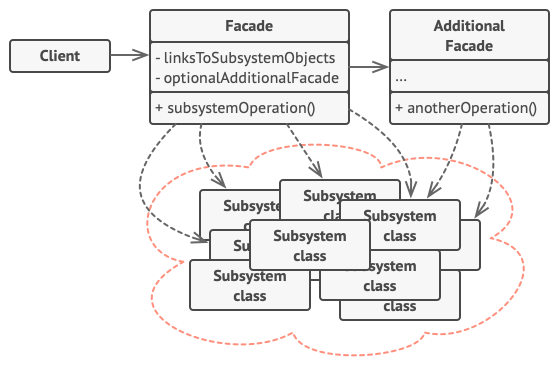
The Facade is a structural design pattern provides a simplified, unified interface to a complex system or set of subsystems. It hides the complexity of the system by exposing only essential methods, making it easier for clients to interact with the system.
Key features:
Simplifies interfaces: Offers a straightforward interface to a complex set of classes, making it easier to use.
Decouples clients: Reduces dependencies between the client and the complex subsystem.
Client has to interact with a large number of interfaces and classes in a subsystem to get result. So client gets tighly coupled with those interfaces and classes. Facade solves this problem.
Facade is NOT just a one to one method forwarding to other classes.
How to implement Facade
To implement a Facade class:
Identify Subsystems: Determine the complex subsystems or classes that the facade will simplify. These are typically classes with complex interactions or multiple methods.
Create the Facade Class: Design a facade class that provides a simplified and unified interface to these subsystems.
Include Subsystem Instances: In the facade class, include instances of the subsystem classes. These can be injected via the constructor or created directly within the facade.
Implement Simplified Methods: Add methods in the facade class that internally call the appropriate methods of the subsystem classes.
Expose the Facade: Use the facade class in your client code to interact with the subsystems through the simplified interface.
Creating Facade class
Create the Subsystem or Service Class:
This class handles the actual logic that will be abstracted by the facade.
interface ApiRepositoryInterface
{
  public function showAll(Collection $collection, int $code = 200): JsonResponse;

  public function showOne(Model $instance, int $code = 200): JsonResponse;
}
Bind the Service to the Service Container
Bind the service class to Laravel's service container via a service provider.
class ApiResponserServiceProvider extends ServiceProvider
{
  public function register(): void
  {
    $this->app->bind(ApiRepositoryInterface::class, function () {
      return new ApiRepository();
    });
  }
}
Now, register the service provider in config/app.php.
// config/app.php

'providers' => [
  // Other Service Providers
  \Multividas\ApiResponser\Providers\ApiResponserServiceProvider::class,
],
Create the Facade Class:
Create the facade class that extends Laravel's Facade class and implements the simplified interface.
class ApiResponser extends Facade
{
  protected static function getFacadeAccessor(): string
  {
    return ApiRepositoryInterface::class;
  }
}
Register the Facade Alias:
Optionally, add the facade alias in the config/app.php file for easy access.
// config/app.php
use Multividas\ApiResponser\Facades\ApiResponser as ApiResponserFacade;

'aliases' => [
  // Other Facade Aliases
  'ApiResponser' => ApiResponserFacade::class,
],
Use the Facade in Controller or Anywhere
Using the ApiResponser facade to access the methods of ApiRepositoryInterface in your controller.
use Multividas\ApiResponser\Facades\ApiResponser;

class PostsController
{
  public function index(): JsonResponse
  {
    return ApiResponser::showAll(Post::all());
  }

  public function show(string $postId): JsonResponse
  {
    $post = Post::find($postId);

    if (!$post instanceof Post) {
      return $this->infoResponse('Post Not Found', 404, (object)[]);
    }

    return ApiResponser::showOne($post);
  }
}
Simplified interface: The ApiResponser facade provides a clean and easy-to-use interface for interacting with the methods of ApiRepositoryInterface (like showAll() and showOne()), hiding the complexity of its underlying implementation.
Static access: With the facade, you're able to access the methods of the underlying ApiRepositoryInterface via static calls (ApiResponser::showAll(), etc.), without worrying about dependency injection or object instantiation in the controller.
Encapsulation: The facade hides the logic of how the ApiRepositoryInterface is resolved, providing a layer of abstraction.
Facade design pattern When:
- You hide complex internals (multiple services under one method); filterData, sortdata, cachedata, paginateData ...
- You simplify API for external usage (clean, consistent calls), so external code doesn't deal with low-level setup, configs, or multiple classes — - just one clean call.
- You encapsulate subsystems without changing original classes.
- You want static-like access to bound services (Laravel style), expl;
QueryFilters::applyFilters()
Conclusion:
- Subsystem:
ApiRepositoryandApiRepositoryInterfacedoes the actual work (structuring and generating API responses). - Facade:
ApiResponserfacade provides a simplified interface for interacting with theApiRepositoryInterface. - Client: The controller (or other parts of the app) can use the
ApiResponserfacade to perform tasks without directly instantiating or interacting with the service.
Additional Resources
Conclusion
As software engineers, we use design patterns daily, this improves readability and lower maintenance cost. Facade Design Pattern provides a simplified, unified interface to a complex system or set of subsystems